
Download PwDone
Editions are separate installers that share the same engine. Pick the one for your files, or grab All editions. Available for Windows 10/11 and macOS 14+ (Apple Silicon).. Latest release: v0.1.0. How it works.
Older versions, release notes and checksums: GitHub Releases
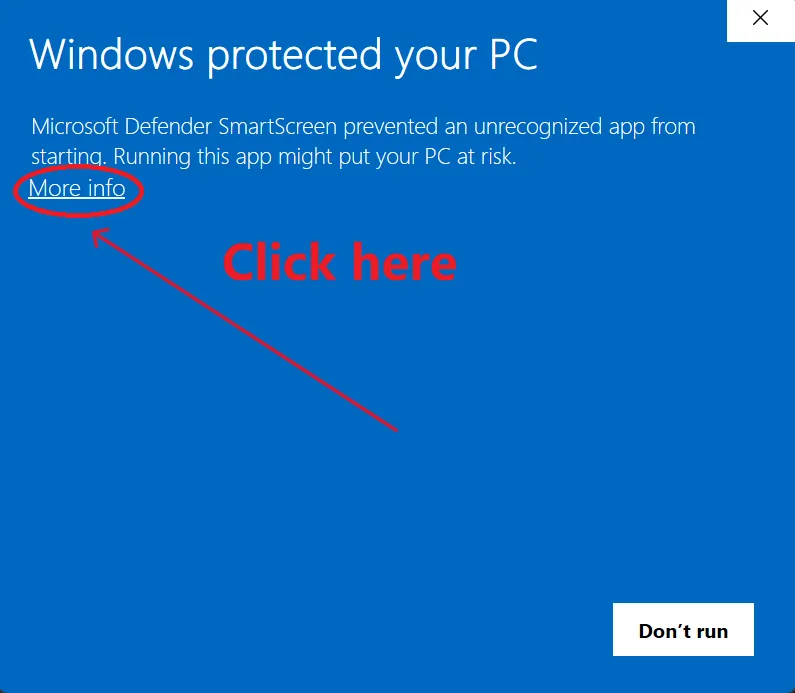
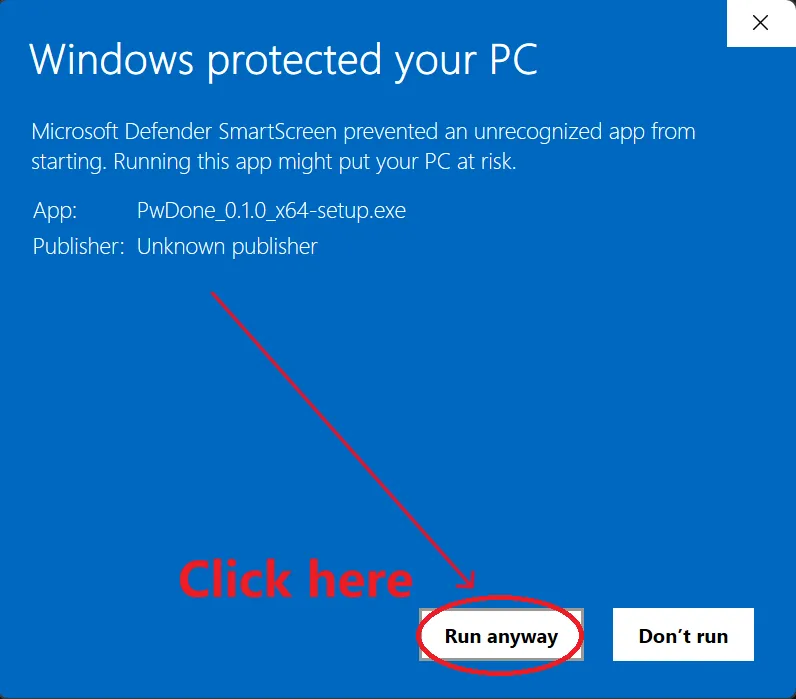
Windows may show a SmartScreen warning because the installer is not yet code-signed. Click More info, then Run anyway. See illustrated steps.
Before you install
- Windows 10/11 (64-bit) or macOS 14+ (Apple Silicon).
- All processing is local. No upload, no telemetry.
If Windows SmartScreen appears
Windows installers may not be code-signed yet. SmartScreen may show "Windows protected your PC". Choose More info, then Run anyway. macOS builds are signed and notarized; if an older build is blocked, right-click the app and choose Open the first time.
Verify your download
Checksums are published next to each installer:SHA256SUMS-macos.txt · SHA256SUMS-windows.txt.